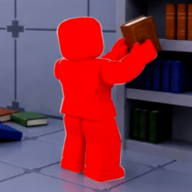
Clean The Library Book List Basics
Clean The Library hides thousands of books across two floors. You do not need to memorize every title — you need a book list system: category tag → shelf code → volume number. Players who search clean the library book list or clean the library book map want exactly this workflow, not a flat alphabetical dump of every title in the game.
Each book displays a category tag on the spine — Obby / Parkour, Brainrot, Simulations, Rules & Moderation, and so on. That tag is your primary lookup key. Cross-reference it against the Clean The Library map to get the section code, then shelve using the sort books guide.
The Roblox version uses a harder search loop than the Steam Arcane Library original — books stay where you drop them after the June 2026 save update, but the sheer volume on both floors still demands a repeatable find-books method instead of random wandering.
Color-First Book Hunting Strategy
The fastest Clean The Library find-books strategy starts with one striking color. Pick a spine color that stands out against the floor chaos — lime green, white with red stripes, bright purple, or vivid anime covers on floor two. Collect every book of that color before switching to the next palette.
Bright colors reduce visual noise. When most scattered books are black or dark brown, a white-and-red spine is visible from across the room. Finish the bright pile section by section, then tackle dark Horror (1H) and Military (2D) covers once the floor is less cluttered.
When two books share a similar color, right-click zoom on PC and read the category tag before running upstairs. Obby / Parkour (1G) and Brainrot (2E) can share loud cover art — the tag separates them instantly.
| Tier | Book type | Find-books approach |
|---|---|---|
| S | Bright-cover sets | Green, white, and yellow spines — easiest to match to shelf sections early. |
| A | Named series | Multi-volume sets (e.g. Spider-Man Collection) — finish in volume order 1→2→3. |
| C | Dark / black spines | Harder to distinguish — save for when you know the section map. |
Using the Map as Your Book List
The in-game floor map is the live book list index for Clean The Library. Open it after every new category tag you encounter. The map shows section codes above bookcase rows — match the tag to the theme label, walk to that code, and shelve.
Obby / Parkour books route to 1G on floor one. Brainrot books route to 2E on floor two — never mix the two even when cover colors look similar. Theme Parks (2F) is upstairs; Obby is downstairs. Confusing those two tags is the most common map lookup error.
Keep the zone reference tables open on a second screen while hunting. Searching a theme name there is faster than walking the 3D library hunting for overhead signs when you are still learning codes.
| Category tag | Section | Floor |
|---|---|---|
| Studio | 1A | Floor 1 |
| Simulations | 1B | Floor 1 |
| Avatar & Catalog | 1C | Floor 1 |
| Myths | 1D | Floor 1 |
| Devex | 1E | Floor 1 |
| Magic | 2A | Floor 2 |
| Anime | 2B | Floor 2 |
| Meditation | 2C | Floor 2 |
| Military | 2D | Floor 2 |
Best pairings for this guide
Matched by build plan, shared topics, and guide progression — not random related links.
Clean The Library map — floor one and floor two shelf section codes.
Section codes are step one — every book routes through the map before shelving
Where each book goes — series order, blue glow shelves, and common mistakes.
Placement and volume order rules apply once you reach the right zone
Staging Piles and Edge Shelves
Advanced find-books play in Clean The Library uses staging piles — designated floor spots or edge shelves where you temporarily place books while continuing the hunt. If you find a Brainrot volume but have not memorized 2E yet, place it on a visible edge shelf near the entrance and keep collecting matching colors.
Staging prevents search interference. Holding five books while hunting a sixth color forces you to drop something — organized staging piles let you resume the color chain without mixing categories. Label piles mentally: green stack, white stack, dark stack.
Never staging-pile inside a wrong section row — that creates a misfile another player might assume is correct. Use open floor space near the spawn or central aisle instead.
Hints, Shelf Guide, and Lookup Tools
Press H in-game when a tag is ambiguous — hints point toward the correct section for your held book. Hints draw from a limited pool, so reserve them for genuinely unclear titles rather than every pickup during your first hour.
After unlocking Shelf Guide magic, you can locate sections without burning hint charges. Pair Shelf Guide with the wiki zone tables for late-game hunting when dark spines dominate the remaining pile. See the best upgrades guide for when to unlock Shelf Guide.
The Insight ability highlights misfiled books on finished rows — useful for find-books at 90%+ completion when one stray volume hides among hundreds of glowing shelves. Insight does not find floor scatter; it audits shelves you already filled.
| Tool | When to use | Cost |
|---|---|---|
| H key hint | Ambiguous category tag mid-session | Limited hint charges |
| Floor map | Every new category tag | Free — open anytime |
| Shelf Guide magic | Mid game — section lookup without hints | Stat points |
| Insight magic | Late game — misfiled row audit | Stat points + cooldown |
| Wiki zone table | Second-screen reference while playing | Free |
Category-Based Book Hunting Routes
Route your find-books runs by category cluster instead of random spirals. A floor one cluster run: start near Simulations (1B) and Studio (1A) wings, sweep toward Rules & Moderation (1F), then finish Obby / Parkour (1G) bright covers. A floor two cluster run: climb for Anime (2B) and Brainrot (2E) first because covers are easy to spot upstairs.
Anime books on floor two use big, colorful spines — many players run an anime-first route to fund early stat points before dark Military (2D) hunting. Collect all visible anime volumes, shelve at 2B, then descend for floor one work.
Rules & Moderation books cluster policy and safety titles — once you learn the 1F location, grab every Rules-tagged book in one loop because they share similar spine layouts and shelve quickly in sequence.
| Route | Sections | Why |
|---|---|---|
| Bright floor 1 | 1A Studio, 1B Simulations, 1G Obby | High-visibility covers, fast stat points |
| Policy sweep | 1F Rules & Moderation | Similar tags, one wing cluster |
| Floor 2 anime | 2B Anime | Large colorful spines stand out upstairs |
| Meme run | 2E Brainrot | Distinct tags after floor two unlocks |
| Dark finish | 1H Horror, 2D Military | Save for last — low visibility spines |
Co-op Book Hunting in Clean The Library
Co-op find-books scales through role split. Runners collect by color or floor and drop at a central pile near the entrance. Shelvers stay at assigned section codes — one player on 1H Horror, another on 2B Anime — and place volumes as runners call out category names.
Call out tags aloud at the dump pile: “Brainrot to 2E”, “Simulations to 1B”. Silent drops force shelvers to re-read every spine. With up to twelve players in one server, voice or chat discipline matters more than individual speed.
Assemble magic on the runner role pulls scattered same-collection books together after a co-op dump — essential once the central pile grows past twenty volumes. Sort magic on the shelver role groups a received pile by color before placement.
| Role | Find-books focus | Best ability |
|---|---|---|
| Runner | Color chains, floor batching, central dump | Assemble + Sprint |
| Shelver | Read tags, place rows, wait for blue glow | Sort + Insight |
| Scout | Learn new tags, update map notes for team | Shelf Guide |
Find Missing Volumes and Skip Strategy
One missing volume in a ten-book series blocks the row glow. The correct find-books response: skip and return. Chase a different color chain elsewhere — the lost copy often surfaces while you hunt a unrelated bright spine. Fifteen minutes staring at one gap costs more than two completed easy rows.
Search the floor near the target section last — dropped books persist after the June 2026 update. Walk the aisle in front of 1F if Rules volumes are missing, or scan the floor two landing for stray Meditation (2C) copies before expanding the search library-wide.
At 95%+ completion, switch from color routing to systematic section sweeps. Walk every row in 1A through 2F with Insight active. One misfile from hour one can hide the final percentage point.
- Do01
Pick one bright color and clear it before touching dark spines.
- Do02
Read the category tag — never route from color alone.
- Do03
Open the floor map for every unfamiliar tag.
- Do04
Stage unknown books on edge floor piles, not wrong shelf rows.
- Do05
Press H only when the tag is genuinely ambiguous.
- Do06
Skip missing volumes; return when the copy appears naturally.
- Do07
In co-op, call out category names at the central dump pile.
- Do08
Use Insight section sweeps below 100% completion.
Common Find-Books Mistakes
- Avoid01
Trying to memorize individual titles instead of sixteen category themes.
- Avoid02
Hunting black and dark brown books before clearing bright piles.
- Avoid03
Burning every H hint on common tags like Simulations or Studio.
- Avoid04
Placing staging books inside active shelf rows instead of open floor space.
- Avoid05
Confusing Obby (1G floor one) with Brainrot (2E floor two) by cover color.
- Avoid06
Splitting co-op roles without a central dump pile — runners overlap shelvers.
- Avoid07
Ignoring right-click zoom when two similar covers sit side by side.
Next Steps for Clean The Library Book Hunters
Find-books skill in Clean The Library is pattern recognition, not encyclopedic memory. Master color routing, category tags, and map codes first — title-level lookup comes naturally after fifty completed rows.
Continue with the how to sort books guide for volume order and blue glow rules, the best upgrades guide to fund Assemble and Shelf Guide, and the beginner guide if you are still learning controls. The Clean The Library book list is really sixteen themes times thousands of volumes — once the themes stick, every hunt gets faster.
More guides that pair well
Matched by build plan, shared topics, and guide progression — not random related links.
Filter all 1A–2F sections by floor and difficulty while you play.
Quick 1A–2F lookup while you play — same data as the map guide, filterable
How to play Clean The Library — controls, first shelves, and stat points.
Fits your library clear plan — Beginner Guide covers the next step in that route
PC and controller keybinds from the official Roblox page.
Fits your library clear plan — Controls covers the next step in that route